IASPUG December Recap

Despite the miserable roads, we had a good crowd show up for Kirk‘s talk. The deck should be available shortly. Also, thanks to ITAGroup for hosting and to Todd for making the trip with some books to give away. Enjoy the holidays and we hope to see you in February!

I was also asked two good questions during the break, which I thought I would share here:

Q: What’s the best way to hide a list field?

A: There are a lot of examples online of using SPD to replace the default new/edit/display list forms, but they are clumsy, break support for attachments (unsupported hack and hotfix notwithstanding), and require customizing (unghosting) the page.

An easier solution is to leverage these properties of SPField:

  • ShowInDisplayForm
  • ShowInEditForm
  • ShowInListSettings
  • ShowInNewForm
  • ShowInVersionHistory
  • ShowInViewForms

These values can be set in a feature receiver or a simple console application, but it’s trivial with PowerShell, as Christian Lessner shows here. Or if you’re writing a feature for a custom content type/list template, the FieldRef element has a similar set of attributes.

Q: Is it possible to e-mail an item in a document library as part of an SPD workflow?

A: While not supported out of the box, I figured it would be possible through custom code. Kirk pointed me to the SPDActivities project on CodePlex, which has an activity to Send Email with List Item attachments. I’m not sure if it works for files in a document library, but it should be an easy fix if it doesn’t.

Posted in Community, Object Model, SharePoint. Tags: , , , , , . Comments Off on IASPUG December Recap

Isolator for SharePoint

With a few exceptions, the SharePoint developer community has been relatively quiet about unit testing and TDD, in part because so much code has tight dependencies on the object model. However, Andrew Woodward recently posted a whitepaper on the subject that caught my eye: Unit Testing SharePoint Solutions – Getting into the Object Model. Featured in the paper is Typemock Isolator, which has just been released in a special SharePoint-only version:

Typemock are offering their new product for unit testing SharePoint called Isolator For SharePoint, for a special introduction price. it is the only tool that allows you to unit test SharePoint without a SharePoint server. To learn more click here.

The first 50 bloggers who blog this text in their blog and tell us about it, will get a Full Isolator license, Free. for rules and info click here.

Posted in Object Model, SharePoint, Tools. Tags: , . Comments Off on Isolator for SharePoint

Multi-Purpose PowerShell Using Function

It’s always bothered me that there isn’t a clean way to deal with IDisposables in PowerShell. It seems Adam Weigert came to the same conclusion and implemented a using function much like the statement found in C# and VB. Note that he also makes use of his implementation of PowerShell try..catch..finally, which is pretty slick. Meanwhile, I’m told Raymond Mitchell has his own using function that he uses to load assemblies, which certainly makes sense to me.

I figure the next evolution is to provide a generic using that covers all the bases:

function using {
    param (
        $inputObject = $(throw "The parameter -inputObject is required."),
        [ScriptBlock] $scriptBlock
    )

    if ($inputObject -is [string]) {
        if (Test-Path $inputObject) {
            [system.reflection.assembly]::LoadFrom($inputObject)
        } elseif($null -ne (
              new-object System.Reflection.AssemblyName($inputObject)
              ).GetPublicKeyToken()) {
            [system.reflection.assembly]::Load($inputObject)
        } else {
            [system.reflection.assembly]::LoadWithPartialName($inputObject)
        }
    } elseif ($inputObject -is [System.IDisposable] -and $scriptBlock -ne $null) {
        Try {
            &$scriptBlock
        } -Finally {
            if ($inputObject -ne $null) {
                $inputObject.Dispose()
            }
            Get-Variable -scope script |
                Where-Object {
                    [object]::ReferenceEquals($_.Value.PSBase, $inputObject.PSBase)
                } |
                Foreach-Object {
                    Remove-Variable $_.Name -scope script
                }
        }
    } else {
        $inputObject
    }
}

Some notes on the code:

  • If $inputObject is a string, I assume it’s an assembly reference…
    • If the string is a path, load as a path
    • Rather than parse the string, I figure the framework knows best; the presence of a PublicKeyToken means it’s probably a full assembly name
    • I considered adding support for this alternative to LoadWithPartialName, but I don’t feel like managing a global “assembly map”; the deprecated shortcut will have to do for now
  • If $inputObject is IDisposable and a script block was supplied…
    • Wrap script execution in Try..Finally to make sure we get to Dispose()
    • Here I disagree with Adam – if the PSObject’s Dispose method was overridden, we should assume it was done for good reason (more on this in a later post) and that the override will respect the object’s disposability.
    • After disposal, I thought it might be nice to take the variable out of scope like C#/VB. Using -scope script will look at variables in the scope where our function was called, and since we don’t know what $inputObject was named before it was passed in, I just compare references instead.
  • Otherwise just punt the object along in the pipeline

Usage

Loading assemblies is pretty straightforward:

using System.Windows.Forms
using 'System.Web, Version=2.0.0.0, Culture=neutral, PublicKeyToken=b03f5f7f11d50a3a'
using C:\Dev\DisposeTest\bin\Debug\DisposeTest.dll

To test IDisposable handling, I use a simple disposable object which returns its hash code in ToString(), instantiated by a helper function:

function new-disp { new-object DisposeTest.Disposable }

To verify that variable scope is handled properly, we need two test scripts. gv is an alias for Get-Variable.

NestedTest.ps1

gv x
using ($x = new-disp) { gv x }
gv x

UsingTest.ps1

$x = 'X'
.\NestedTest.ps1
using ($y = new-disp) { gv y }
gv y

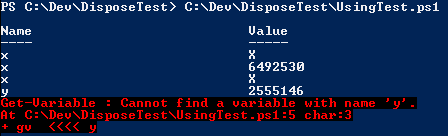
From the behavior in C#/VB, we expect that the object being ‘used’ will only be available within the scope of the script block. So when we enter NestedTest.ps1, we should see the $x remains ‘X’, inherited from the parent scope, both before and after the using statement. Similarly, we expect $y will not be accessible outside of the using block:

SharePoint Example

using Microsoft.SharePoint
using ($s = new-object Microsoft.SharePoint.SPSite('http://localhost/')) {
  $s.AllWebs | %{ using ($_) { $_ | select Title, Url } }
}
if($s -eq $null) { 'Success!' }

It’s not exceedingly friendly for interactive mode, particularly for tab completion, but it should aid script readability.

ContentDeploymentJobCollection GetEnumerator Not Implemented?

Mike Hodnick just posted about programmatically executing content deployment jobs and I figured I’d skip the console app in favor of PowerShell:

[system.reflection.assembly]::LoadWithPartialName("Microsoft.SharePoint.Publishing")
[Microsoft.SharePoint.Publishing.Administration.ContentDeploymentJob]::GetAllJobs()

And much to my surprise, I was greeted with a NotImplementedException:
NotImplementedException from ContentDeploymentJob.GetAllJobs() in PowerShell

However, the following works fine:

$cdj = [Microsoft.SharePoint.Publishing.Administration.ContentDeploymentJob]
$cdj::GetAllJobs().GetEnumerator() | %{ $_.Name; $_.Run() }

What’s going on here? Well first, let’s see if we can replicate the exception in the console app:
NotImplementedException from ContentDeploymentJob.GetAllJobs() in Console Application

Why would I think to explicitly cast the collection to IEnumerable in the first place? Well when PowerShell sees an enumerable object in the pipeline, it “unwraps” it to pass its members along to the next command in line. To facilitate this, I’m guessing the runtime does something to this effect:

if(currentItemInPipeline is IEnumerable)
  HandleEnumerable(currentItemInPipeline as IEnumerable);

And HandleEnumerable probably has a method signature like this:

void HandleEnumerable(IEnumerable enumerableItem) { ...

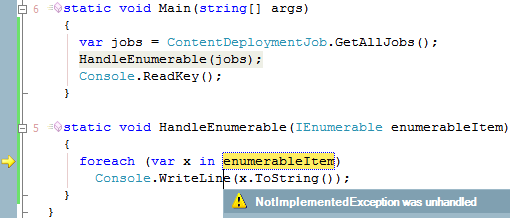
If we apply that pattern to our collection, we see the exception again:
NotImplementedException from ContentDeploymentJob.GetAllJobs() in HandleEnumerable

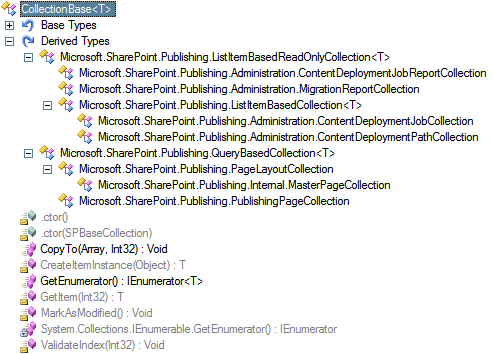
So what’s the big deal? Well, reflecting the object heirarchy above ContentDeploymentJobCollection we find CollectionBase<T>, which has two implementations of GetEnumerator:

public IEnumerator<T> GetEnumerator() {
    return new StandardEnumerator<T>((CollectionBase<T>) this);
}

IEnumerator IEnumerable.GetEnumerator() {
    throw new NotImplementedException();
}

The former is pretty standard; the latter is an explicit implementation of the interface method. When our ContentDeploymentJobCollection object is used as an IEnumerable, like my test variable and in HandleEnumerable (and presumably in the PowerShell runtime), the explicit implementation is used and throws the exception. On the other hand, if we make PowerShell use the implemented GetEnumerator, everything works as expected.

And for completeness, Mike’s foreach compiles into the following IL, calling the desired method:

callvirt   instance class [mscorlib]System.Collections.Generic.IEnumerator`1<!0> class [Microsoft.SharePoint.Publishing]Microsoft.SharePoint.Publishing.CollectionBase`1<class [Microsoft.SharePoint.Publishing]Microsoft.SharePoint.Publishing.Administration.ContentDeploymentJob>::GetEnumerator()

So if you’re getting a NotImplementedException when using a collection that inherits from Microsoft.SharePoint.Publishing.CollectionBase<T>, make sure you’re calling the correct GetEnumerator.

Collections affected:

  • Microsoft.SharePoint.Publishing.Administration.ContentDeploymentJobCollection
  • Microsoft.SharePoint.Publishing.Administration.ContentDeploymentJobReportCollection
  • Microsoft.SharePoint.Publishing.Administration.ContentDeploymentPathCollection
  • Microsoft.SharePoint.Publishing.Administration.MigrationReportCollection
  • Microsoft.SharePoint.Publishing.PageLayoutCollection
  • Microsoft.SharePoint.Publishing.PublishingPageCollection

Microsoft.SharePoint.Publishing.CollectionBase<T> Derived Types

SPDataSource Mystery Modes: Webs & ListOfLists

Chris O’Brien is right: SPDataSource is quite handy. However, its documentation leaves something to be desired. In particular, there aren’t any examples (that I can find) of how to use the Webs and ListOfLists SPDataSourceModes. It turns out that the result sets map to a subset of properties (both internal and public) of SPWeb and SPList, respectively—but prepended with “__sp”. An easy way to see all available fields is to bind the data source to an asp:GridView with auto-generated columns:

<WSS:SPDataSource runat="server" ID="dsWebs" DataSourceMode="Webs" />
<asp:GridView runat="server" ID="grdWebs" DataSourceID="dsWebs" AutoGenerateColumns="True">
    <RowStyle VerticalAlign="Top" />
</asp:GridView>
<WSS:SPDataSource runat="server" ID="dsLists" DataSourceMode="ListOfLists" />
<asp:GridView runat="server" ID="grdLists" DataSourceID="dsLists" AutoGenerateColumns="True">
    <RowStyle VerticalAlign="Top" />
</asp:GridView>

For easy reference, I’ve put together a complete list of fields here:
SPDataSource Fields for Webs & ListsOfLists

Note that SharePoint Designer’s live preview of the grid shows extra columns (for Webs: __spAlerts, __spAllProperties, __spAllUsers, etc) that aren’t included in the rendering outside of Designer.

SPDataSourceMode.Webs Example

A list of fields is all well and good, but what can we do with it? Suppose we want an easy way to access our favorite settings pages for our subwebs. A contrived example, perhaps, but it will serve its purpose. We start with our data source:

<WSS:SPDataSource runat="server" ID="dsWebs"
  DataSourceMode="Webs" IncludeHidden="true"/>

Next, we’ll define a MenuTemplate of the site settings shortcuts we want available. %URL% is a token we’ll define in our SPMenuField.

<WSS:MenuTemplate runat="server" ID="WebMenu" CompactMode="true">
  <WSS:MenuItemTemplate runat="server" Text="Create"
    ClientOnClickNavigateUrl="%URL%/_layouts/create.aspx" />
  <WSS:MenuItemTemplate runat="server" Text="Site Settings"
    ClientOnClickNavigateUrl="%URL%/_layouts/settings.aspx" />
  <WSS:MenuSeparatorTemplate runat="server" />
  <WSS:MenuItemTemplate runat="server" Text="People and groups"
    ClientOnClickNavigateUrl="%URL%/_layouts/people.aspx" />
  <WSS:MenuItemTemplate runat="server" Text="Advanced permissions"
    ClientOnClickNavigateUrl="%URL%/_layouts/user.aspx" />
  <WSS:MenuSeparatorTemplate runat="server" />
  <WSS:MenuItemTemplate runat="server" Text="Site libraries and lists"
    ClientOnClickNavigateUrl="%URL%/_layouts/mcontent.aspx" />
  <WSS:MenuItemTemplate runat="server" Text="Sites and workspaces"
    ClientOnClickNavigateUrl="%URL%/_layouts/mngsubwebs.aspx" />
  <WSS:MenuItemTemplate runat="server" Text="Site features"
    ClientOnClickNavigateUrl="%URL%/_layouts/ManageFeatures.aspx" />
 <WSS:MenuItemTemplate runat="server" Text="Delete this site"
    ClientOnClickNavigateUrl="%URL%/_layouts/deleteweb.aspx" />
</WSS:MenuTemplate>

And finally, a simple SPGridView with a link and menu for our site, with an extra column just for good measure:

<WSS:SPGridView runat="server" ID="spGrdWebs"
  DataSourceID="dsWebs" AutoGenerateColumns="false">
  <Columns>
    <WSS:SPMenuField HeaderText="Site Title"
      NavigateUrlFields="__spDefaultUrl"
      NavigateUrlFormat="{0}"
      MenuTemplateId="WebMenu"
      TokenNameAndValueFields="URL=__spUrl,ID=__spID"
      TextFields="__spTitle" />
    <WSS:SPBoundField HeaderText="Site Created"
      DataField="__spCreated" />
  </Columns>
</WSS:SPGridView>

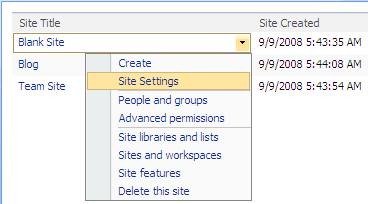
And our final result will look something like this:

So we’ve seen how to use SPDataSource in Webs mode, plus we have a code-free example of the often-overlooked SPMenuField. For what else could the Webs and ListOfLists modes be used?

Quick Tip: Local Central Admin SPWebApplication

I’ve seen several incoming searches like “SPWebApplication for Central Admin”, so hopefully this will provide a quick answer:

SPAdministrationWebApplication.Local

Which really just returns:

SPAdministrationWebApplication.GetInstanceLocalToFarm(SPFarm.Local);

And a quick example in PowerShell for good measure:

PS C:\> [system.reflection.assembly]::LoadWithPartialName("Microsoft.SharePoint") > $null
PS C:\> $ca = [Microsoft.SharePoint.Administration.SPAdministrationWebApplication]::Local
PS C:\> $ca.DefaultServerComment
SharePoint Central Administration v3
PS C:\> $ca.AdministrativeTasks.Items | select Title -first 3

Title
-----
Add anti-virus protection
READ FIRST - Click this link for deployment instructions
Configure Workflow Settings

Hope this helps!

Is SPList.ParentWeb a Leak?

As previously discussed, doing the “right thing” with our SPSite and SPWeb references’ disposability is way harder than it should be. And even worse is the fact that the experts don’t seem to agree how that should be done. Now I’m definitely not an expert, and I’m not even sure who’s moderating the debate, but I’m intrigued so I guess I’ll invite myself anyway.

First, the code in question, from a useful STSADM extension by Gary Lapointe:

  lvw = new ListViewWebPart();
  SPList list = Utilities.GetListFromViewUrl(listUrl);
  if (list == null)
    throw new ArgumentException("List not found.");

  lvw.ListName = list.ID.ToString("B").ToUpperInvariant();
  lvw.TitleUrl = list.DefaultViewUrl;
  lvw.WebId = list.ParentWeb.ID;

The question: Does list.ParentWeb need to be disposed? My first instinct was that it does, based on this quote from Roger Lamb’s dispose patterns:

When using the SPList.BreakRoleInheritance() method a internal call to ParentWeb property is called and must be disposed by the caller.

But upon further consideration, is that even true? Well, let’s reflect SPList.ParentWeb to see what we’re dealing with:

    if (!SPUtility.StsCompareStrings(this.m_Lists.Web.ServerRelativeUrl, this.ParentWebUrl)) {
      if (this.m_parentWeb == null) {
        this.m_parentWeb = this.m_Lists.Web.Site.OpenWeb(this.ParentWebUrl);
      }
    }
    else {
      return this.m_Lists.Web;
    }
    return this.m_parentWeb;

Or rewritten for clarity:

    if (SPUtility.StsCompareStrings(this.m_Lists.Web.ServerRelativeUrl, this.ParentWebUrl))
        return this.m_Lists.Web;

    if (this.m_parentWeb == null)
        this.m_parentWeb = this.m_Lists.Web.Site.OpenWeb(this.ParentWebUrl);
    return this.m_parentWeb;

So if the list’s parent collection matches its ParentWebUrl, it uses the collection’s Web; if not it returns m_parentWeb, which Reflector verifies is only set by the preceding call to Site.OpenWeb(). As far as I can tell, every call to OpenWeb requires a matching call to Dispose, and as SPList isn’t IDisposable that responsibility would seem to fall to the developer. So we should Dispose, right? Well, maybe… We can’t forget about the first if: OpenWeb is only called if the list isn’t in its collection’s web. (Bonus question: how could that happen?)

So it seems the most common scenario is that SPList.ParentWeb will just defer to SPListCollection.Web, which returns SPListCollection.m_web. And m_web is only set by an internal SPListCollection constructor, used by SPWeb.Lists:

    if (this.m_Lists == null)
      this.m_Lists = new SPListCollection(this);
    return this.m_Lists;

So with all that in mind, consider the following code:

    SPWeb web = SPContext.Current.Web;
    SPList list = web.Lists["ListName"];
    list.BreakRoleInheritance();
    list.ParentWeb.Dispose(); // Best practice?

BreakRoleInheritance does indeed have an internal reference to ParentWeb (hidden in SPList.SecurableObjectImpl), but in this case ParentWeb will be web, which is our context web and should not be disposed!

So back to Gary’s example. Before we can decide how to handle list.ParentWeb, we should check out the helper that created list for us:

    internal static SPList GetListFromViewUrl(string url) {
      using (SPSite site = new SPSite(url))
      using (SPWeb web = site.OpenWeb()) {
        return GetListFromViewUrl(web, url);
      }
    }

Since the SPWeb was opened based on the list URL, it should be safe to assume that ParentWeb won’t need to call OpenWeb again and will instead use Lists.Web, which will be a reference to the original webwhich is disposed (by using) in the helper. So list.ParentWeb indeed doesn’t need to be disposed because it’s already been disposed. In practice we can probably get away with it (in this case), but there are no guarantees that a disposed SPWeb will be in a consistent state when we get around to using it.

Though we’ve answered the original question of disposal, we should really eliminate the post-disposal reference. My preference is to refactor the ListViewWebPart code into helpers modeled after Gary’s existing GetListFromViewUrl methods:

    internal static ListViewWebPart GetListViewWebPartFromViewUrl(string url) {
      using (SPSite site = new SPSite(url))
      using (SPWeb web = site.OpenWeb()) {
        return GetListViewWebPartFromViewUrl(web, url);
      }
    }

    internal static ListViewWebPart GetListViewWebPartFromViewUrl(SPWeb web, string url) {
      ListViewWebPart lvw;
      lvw = new ListViewWebPart();
      SPList list = GetListFromViewUrl(web, url);
      if (list == null)
        throw new ArgumentException("List not found.");

      lvw.ListName = list.ID.ToString("B").ToUpperInvariant();
      lvw.TitleUrl = list.DefaultViewUrl;
      lvw.WebId = web.ID;
      return lvw;
    }

Which greatly simplifies the original code and eliminates the ParentWeb risk:

  lvw = Utilities.GetListViewWebPartFromViewUrl(listUrl);

Conclusions

So back again to the original question: Does SPList.ParentWeb need to be disposed? The answer seems to be a qualified “probably not”. But even if we’re not leaking an SPWeb reference, more concerning is the potential for ParentWeb to return an object that has already been disposed. If nothing else, be careful with ParentWeb on lists returned from helpers that might have cleaned up prematurely.
PowerShellASP with SharePoint

PowerShellASP was announced earlier this week, and naturally my first thought was “Does it work with SharePoint?” It turns out that it does, but only for paths mapped to the file system (_layouts, _admin, etc). I’m hoping the authors will consider making a SharePoint extension of the handler to support files stored in the content database as well (more on that later). Just think…writing PowerShell in SharePoint Designer! What could be better?!

Solutionizing PoShASP

Of course you could just follow the provided installation instructions by hand, but what if we wanted to use a WSP?

Step 1: Install PowerShell 1.0

PowerShell is included on Windows Server 2008; for other flavors of Windows, download here.

Step 2: Web.Config Changes

PoShASP requires adding an HttpHandler to web.config. The preferred way to do this is through a WebApplication-scoped feature receiver. The code would look something like this:

using System;
using System.Collections.Generic;
using System.Collections.ObjectModel;
using Microsoft.SharePoint;
using Microsoft.SharePoint.Administration;

namespace Solutionizing.PowerShellASP {
  class WebApplicationFeatureReceiver : SPFeatureReceiver {
    private const string MODS_OWNER = "PowerShellASP";
    private const string PS_VERB = "*";
    private const string PS_PATH = "*.ps1x";
    private const string PS_TYPE = "PowerShellToys.PowerShellASP.PSHandler, PowerShellToys.PowerShellASP";
    private const string MOD_PATH  = "configuration/system.web/httpHandlers";
    private const string MOD_NAME  = @"add[@path=""{0}""]";
    private const string MOD_VALUE = @"<add verb=""{0}"" path=""{1}"" type=""{2}""/>";

    private SPWebConfigModification AddHttpHandler(string verb, string path, string type) {
      SPWebConfigModification mod = new SPWebConfigModification(string.Format(MOD_NAME, path), MOD_PATH);
      mod.Value = String.Format(MOD_VALUE, verb, path, type);
      mod.Owner = MODS_OWNER;
      mod.Sequence = 0;
      mod.Type = SPWebConfigModification.SPWebConfigModificationType.EnsureChildNode;
      return mod;
    }

    public override void FeatureActivated(SPFeatureReceiverProperties properties) {
      SPWebApplication webApp = properties.Feature.Parent as SPWebApplication;
      webApp.WebConfigModifications.Add(AddHttpHandler(PS_VERB, PS_PATH, PS_TYPE));
      webApp.Farm.Services.GetValue<SPWebService>().ApplyWebConfigModifications();
    }

    public override void FeatureDeactivating(SPFeatureReceiverProperties properties) {
      SPWebApplication webApp = properties.Feature.Parent as SPWebApplication;
      Collection<SPWebConfigModification> mods = webApp.WebConfigModifications;

      int startCount = mods.Count;
      for (int c = startCount - 1; c >= 0; c--) {
        SPWebConfigModification mod = mods[c];
        if (mod.Owner == MODS_OWNER)
          mods.Remove(mod);
      }

      if (startCount > mods.Count) {
        webApp.Update();
        webApp.Farm.Services.GetValue<SPWebService>().ApplyWebConfigModifications();
      }
    }

    public override void FeatureInstalled(SPFeatureReceiverProperties properties) { }
    public override void FeatureUninstalling(SPFeatureReceiverProperties properties) { }
  }
}

And we need a feature for the receiver. (Download image here.)
PowerShell Logo

<Feature Id="316F5804-C11B-4E4B-9CD3-E6BD6801091A"
         Title="PowerShellASP"
         Description="Installs PowerShellASP - http://www.powershelltoys.com/"
         Scope="WebApplication"
         Version="1.0.0.0"
         ImageUrl="PowerShellASP/PoSh_60x45.jpg"
         ImageUrlAltText="PowerShell"
         ReceiverAssembly="Solutionizing.PowerShellASP, ..."
         ReceiverClass="Solutionizing.PowerShellASP.WebApplicationFeatureReceiver"
         xmlns="http://schemas.microsoft.com/sharepoint/" />

Step 3: Test Script

Before we finish the package, let’s add a sample script in LAYOUTS – test.ps1x:

<html>
<body>
<% $s = new-object Microsoft.SharePoint.SPSite($Request.Url) %>
<% $raw = $Request.RawUrl %>
<% $w = $s.OpenWeb($raw.Substring(0, $raw.IndexOf($Request.Path))) %>
<h1>Hidden Lists in <a href="<%=$w.Url %>"><%=$w.Title %></a></h1>
<table width="100%">
<tr><th>List Title</th><th>Items<tr></th></tr>
<% $w.Lists | ?{$_.Hidden -eq $true} |
   sort @{expression="ItemCount";Ascending=$true},@{expression="Title";Descending=$true} | %{ %>
<tr>
  <td><a href="<%= $w.Url %><%= $_.DefaultViewUrl %>"><%= $_.Title %></a></td>
  <td><%= $_.ItemCount %></td>
</tr>
<tr><td colspan="2"><p style="overflow: auto; height: 8em">
<%= [Microsoft.SharePoint.Utilities.SPEncode]::HtmlEncode($_.PropertiesXml) %>
</p></td></tr>
<% } %>
</table>
<pre>
<% $w %>
<% $s %>
<% $Request %>
</pre>
</body>
</html>

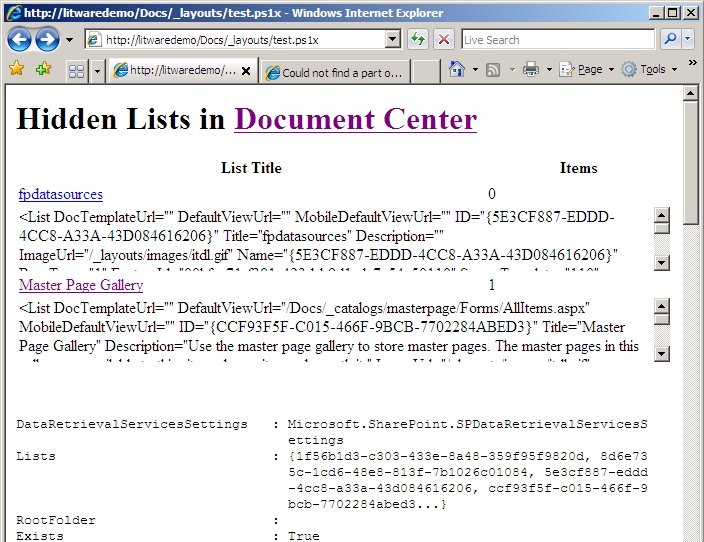
This contrived example fetches the current SPSite and SPWeb and then outputs a table of the hidden lists in the current site with a few properties. It also dumps the default PowerShell view of the current SPWeb, SPSite and HttpRequest objects. It’s not exactly pretty, but it sufficiently demonstrates a few key concepts of PoShASP.

Step 4: Deploy DLL

The final piece is the assembly, which needs to go in the web application’s bin directory. Our solution brings everything together:

<Solution SolutionId="5C594B30-9AE5-4910-8DA2-1D7BA622FACC"
          ResetWebServer="True"
          xmlns="http://schemas.microsoft.com/sharepoint/">
  <FeatureManifests>
    <FeatureManifest Location="PowerShellASP\feature.xml" />
  </FeatureManifests>
  <TemplateFiles>
    <TemplateFile Location="IMAGES\PowerShellASP\PoSh_60x45.jpg" />
    <TemplateFile Location="LAYOUTS\PowerShellASP\test.ps1x" />
  </TemplateFiles>
  <Assemblies>
    <Assembly Location="Solutionizing.PowerShellASP.dll"
              DeploymentTarget="GlobalAssemblyCache" />
    <Assembly Location="PowerShellToys.PowerShellASP.dll"
              DeploymentTarget="WebApplication" />
  </Assemblies>
</Solution>

Step 5: Deploy

Now that our solution is complete, we can install and deploy the WSP. Note that the package contains a resource—the PoShASP DLL—scoped for a web application, so deploy accordingly. Once the solution is deployed, the feature needs to be activated through Central Admin or stsadm (or PowerShell ;). If all goes according to plan, the application’s bin directory will contain PowerShellToys.PowerShellASP.dll and web.config will have an HttpHandler for .ps1x files. Now open your browser to http://yourapp/_layouts/PowerShellASP/test.ps1x and see what we have. You can also try http://yourapp/SubSite/_layouts/PowerShellASP/test.ps1x to see the change in site context. (Screenshot was taken before I rolled test.ps1x into my test solution.)

From Content Database

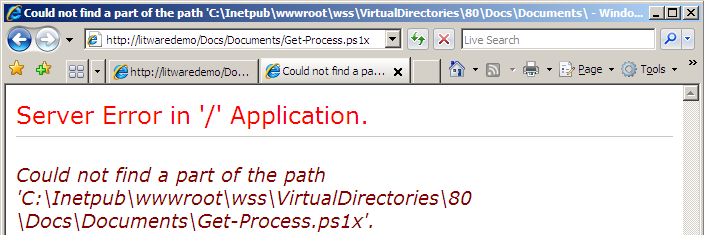
Earlier I mentioned that the handler doesn’t work for scripts stored in the content database. The easiest way to test this is to upload a .ps1x file to a document library. Attempting to open the file yields a lovely exception. So where is this exceptional path coming from? Well the stack trace gives us a good place to start:

   System.IO.StreamReader..ctor(String path) +112
   PowerShellToys.PowerShellASP.PSHandler.a(String A_0) +75

Cue Reflector. In PSHandler.a(String A_0) we find the following:

    using (StreamReader reader = new StreamReader(A_0)) {
      ...

And A_0 comes from the implementation of IHttpHandler.ProcessRequest(HttpContext):

    string filename = A_0.Request.MapPath(A_0.Request.FilePath);
    ...
    this.a(filename);

Since Docs/Documents/Get-Process.ps1x doesn’t map to anything special like _layouts, IIS just maps it to the local root of the site. We know this won’t work, but how can we let the handler in on our little secret? In my next post I’ll go over some code that could get us to that point.

With or without the content database limitation, how would you use PowerShellASP with SharePoint?

SPSite/SPWeb Leaks Revisited

A while back I posted a rather clumsy technique to mitigate an SPWeb leak discussed here. I knew there had to be a better way, and Rob Garrett‘s use of delegates seems to have potential.

But first, I should point out a rather subtle leak in Chris’s and my code:

        list = currentContext.Site.AllWebs["MyWeb"].Lists["MyList"];

See it? How about now:

        SPWeb web = currentContext.Site.AllWebs["MyWeb"];
        list = web.Lists["MyList"];

The context SPSite shouldn’t be disposed, but AllWebs returns an SPWeb that should (according to Roger Lamb):

        using (SPWeb web = currentContext.Site.AllWebs["MyWeb"]) {
          list = web.Lists["MyList"];
        }

That Chris and I (and our readers) can overlook this in posts about SPWeb leaks is a testament to how tricky this stuff can be.

Super Delegates?

So how would Rob’s technique be used to DoSomething? Well none of his helpers take advantage of SPContext, so first let’s add a helper for that:

public static void GetContextWebByTitle(string title, Action<SPSite, SPWeb> action) {
  if (String.IsNullOrEmpty(title))
    throw new ArgumentNullException("title");
  if (null == action)
    throw new ArgumentNullException("action");

  SPContext currentContext = SPContext.Current;
  if (null == currentContext)
    throw new SPException("Context is null!");

  SPSite site = currentContext.Site;
  using (SPWeb web = site.AllWebs[title]) {
    if (null == web)
      throw new SPException("Web not found");
    action(site, web);
  }
}

Now we can refactor into a method that matches the delegate:

public void DoSomething(SPSite site, SPWeb web) {
  SPList list = web.Lists["MyList"];

  // do something with list..
  foreach (SPListItem item in list.Items) {
    processItem(item);
  }
}

And our original DoSomething() just determines which helper to call:

public void DoSomething() {
  if (SPContext.Current != null)
    SPHelper.GetContextWebByTitle("MyWeb", DoSomething);
  else
    SPHelper.GetWebByTitle("http://litwaredemo", "MyWeb", DoSomething);
}

Pretty simple. But we’re still thinking a bit too much – couldn’t GetWebByTitle check context for us? Of course:

  if (SPContext.Current != null)
    GetContextWebByTitle(title, action);
  else
    using (var site = new SPSite(url)) {
      ...

So we don’t have to think at all:

public void DoSomething() {
  SPHelper.GetWebByTitle("http://litwaredemo", "MyWeb", DoSomething);
}

I still need to try this technique in some real code, but I like the theory. It certainly makes sense to separate the logic to create and dispose SPSite/SPWeb objects from the code to manipulate them, and it’s even better to standardize that logic. But even with an arsenal of slick helpers, a leaky delegate can take us back to where we started:

public void DoSomething(SPSite site) {
  foreach (SPWeb web in site.AllWebs)
    processWeb(web);
}

Not that this diminishes the value of Rob’s solution, it just reinforces the need for developers to know the disposal patterns even with help.

Theme-amajig Refactored: Using Feature Properties

In a previous post, I described a feature that would take install and retract modifications to SPTHEMES.XML. Peter Seale suggested providing a method to reapply the changes without a deactivate/activate cycle, specifically for new servers added to a farm. It should be as simple as providing a user interface to call FeatureThemesJob.InstallThemes, but that presents a bit of a problem: InstallThemes expects the name of the themes file, which I declare in the feature receiver. So before we can work on a reapplication interface, let’s move that file name to a more accessible location.

The Revised Feature

A better way to store the theme file name would be as a Feature Property:

<Feature
  Id="E2F8D046-607D-4BB6-93CC-2C04CF04099E"
  Title="SPHOLS Themes"
  Description="Installs SPHOLS and SPHOLSX themes on farm."
  Version="1.0.0.0"
  Scope="Farm"
  ReceiverAssembly="MyBranding, ..."
  ReceiverClass="MyBranding.MyThemesFeatureReceiver"
  xmlns="http://schemas.microsoft.com/sharepoint/">
  <ElementManifests>
    <ElementFile Location="SPTHEMES.XML" />
  </ElementManifests>
  <Properties>
    <Property Key="Solutionizing:ThemesFile" Value="SPTHEMES.XML" />
  </Properties>
</Feature>

And we can remove references to THEMES_FILE from our receiver:

namespace MyBranding {
  public class MyThemesFeatureReceiver : SPFeatureReceiver {
    public override void FeatureActivated(SPFeatureReceiverProperties properties) {
      if (properties == null)
        throw new ArgumentNullException("properties");
      FeatureThemesJob.InstallThemes(properties.Definition);
    }

    public override void FeatureDeactivating(SPFeatureReceiverProperties properties) {
      if (properties == null)
        throw new ArgumentNullException("properties");
      FeatureThemesJob.DeleteThemes(properties.Definition);
    }

    public override void FeatureInstalled(SPFeatureReceiverProperties properties) { }
    public override void FeatureUninstalling(SPFeatureReceiverProperties properties) { }
  }
}

Note that this code is now completely feature-agnostic, reusable for any themes feature.

FeatureThemesJob

Other than purging the logic to persist _themesFile, which I’ll leave as an exercise for the reader, we just need to update Execute to use our new feature property:

    private const string PROP_THEMES_FILE = "Solutionizing:ThemesFile"
    private const string SPTHEMES_PATH = @"TEMPLATE\LAYOUTS\1033\SPTHEMES.XML";
    public override void Execute(Guid targetInstanceId) {
      SPFeatureDefinition fDef = Farm.FeatureDefinitions[_featureID];
      if (fDef != null) {
        SPFeatureProperty themesFileProp = fDef.Properties[PROP_THEMES_FILE];
        if(themesFileProp == null)
          throw new SPException(string.Format("Feature '{0}' is missing property '{1}'.", fDef.DisplayName, PROP_THEMES_FILE));

        DoMerge(SPUtility.GetGenericSetupPath(SPTHEMES_PATH), Path.Combine(fDef.RootDirectory, themesFileProp.Value));
      }
    }

But since we’re in a refactoring mood, we might as well extract the code to retrieve the themes file path:

    internal const string PROP_THEMES_FILE = "Solutionizing:ThemesFile"
    private const string ERR_FEATURE_NOT_FOUND = "Feature '{0}' not found in farm.";
    private const string ERR_MISSING_PROPERTY = "Feature '{0}' is missing property '{1}'.";
    internal string ThemesFilePath {
      get {
        SPFeatureDefinition fDef = Farm.FeatureDefinitions[_featureID];
        if (fDef == null)
          throw new SPException(string.Format(ERR_FEATURE_NOT_FOUND, _featureID));

        SPFeatureProperty prop = fDef.Properties[PROP_THEMES_FILE];
        if (prop == null)
          throw new SPException(string.Format(ERR_MISSING_PROPERTY, fDef.DisplayName, PROP_THEMES_FILE));

        return Path.Combine(fDef.RootDirectory, prop.Value);
      }
    }

Which makes Execute rather elegant:

    private const string SPTHEMES_PATH = @"TEMPLATE\LAYOUTS\1033\SPTHEMES.XML";
    public override void Execute(Guid targetInstanceId) {
      DoMerge(SPUtility.GetGenericSetupPath(SPTHEMES_PATH), ThemesFilePath);
    }

Now everything we need for the timer job is available from the feature definition. The next step is to build an interface to run the job on demand. Stay tuned!